Why Your iPhone Screen Recording Looks Dim After Posting (and How to Fix It)
A screen recording can look great on your iPhone and then come out dim once it’s posted, whether on Threads, Instagram, or through a scheduling tool like Buffer. Usually the cause is HDR, and the fix is one setting.
Why HDR recordings look dim
iPhones can record the screen in HDR. The video is then saved as HEVC HDR10, which stores a much wider range of brightness than a normal video. On your iPhone’s display, that looks right.
Many platforms can’t show HDR, or at least not from every upload path. They convert the video to standard dynamic range on their servers, and that conversion is often done badly: the video ends up darker and flatter than the original. Third-party publishing tools make it more likely, because they go through each network’s API, and the API is often stricter than the network’s own app.
The video isn’t broken. It just carries colour information that the next step in the chain doesn’t know how to handle.
Switch Screen Capture to SDR
- Open Settings → General → Screen Capture.
- Under Format, tap SDR (Most Compatible).
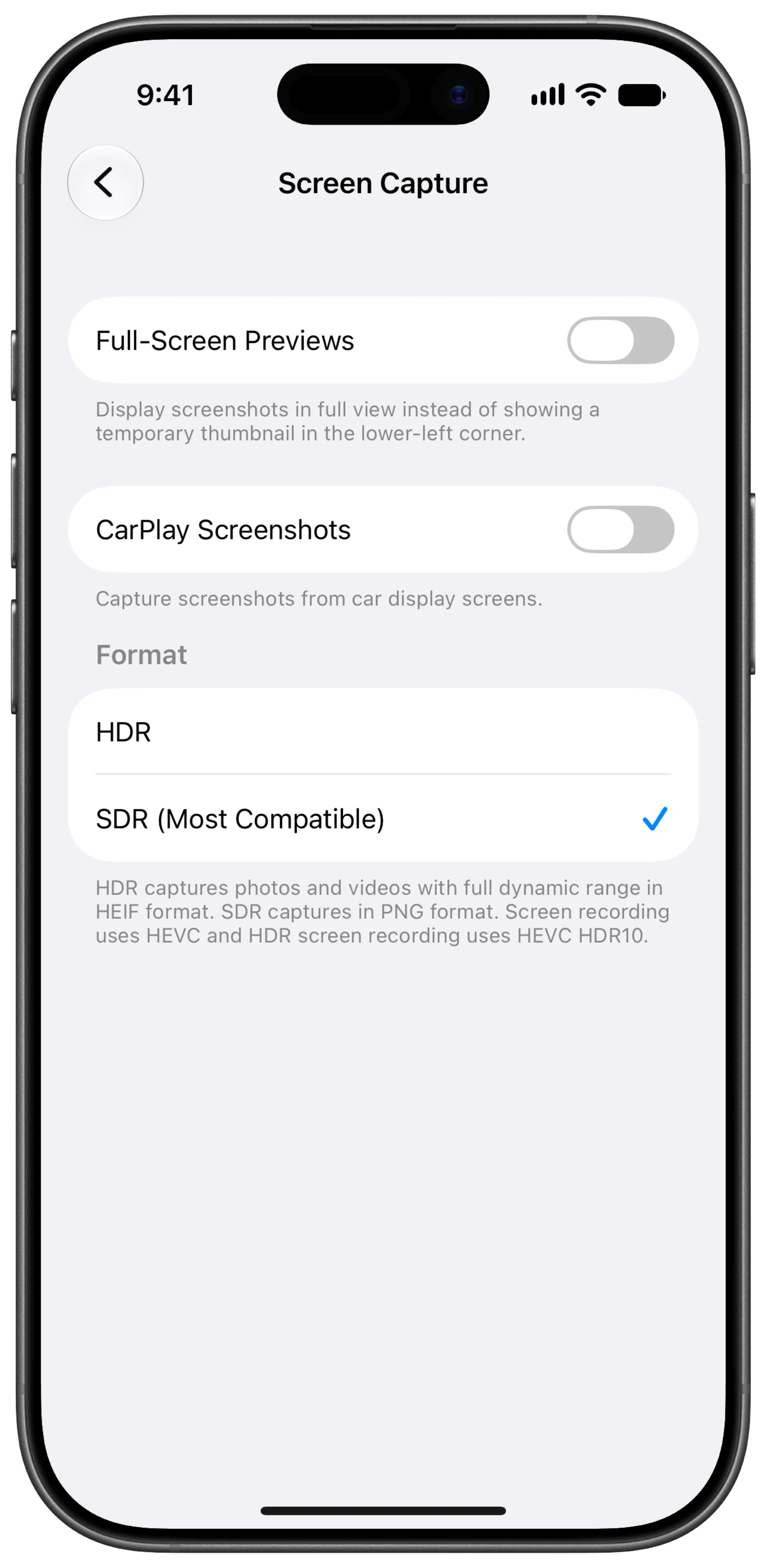
As Apple’s note under the setting says, SDR screen recordings still use HEVC, just without HDR10. Screenshots are saved as PNG instead of HEIF.
Re-record what you captured in HDR
The setting only changes new recordings. A video you already recorded in HDR stays HDR, and so does any mockup video you make from it in Screeny. Record the screen again with SDR on, then frame the new recording.
If a platform still re-encodes your video
Some tools, Buffer among them, also prefer H.264 over HEVC and re-encode anything else before posting. That re-encode costs a little sharpness, not brightness. If you want to avoid it too, you can convert the video to H.264 with a Shortcut straight from the share sheet.
Frequently asked questions
Does SDR make my recordings look worse? On an iPhone display, the brightest highlights look a little less bright. For screen recordings of an app, that’s rarely visible, and most people watch your post on a platform that shows SDR anyway.
Should I switch back to HDR afterwards? Only if you record videos that stay on Apple devices, like a clip you AirDrop to a friend. For anything you post, SDR is the safer default.
Does this affect screenshots too? Yes. With SDR selected, screenshots are saved as PNG instead of HEIF, which also makes them easier to open on other platforms.